

An automation business analyst helps companies find tasks they can automate and explains how those tasks should work after automation.
The role connects business teams with developers. It involves understanding work processes, gathering requirements, planning improvements, and checking whether an automated solution meets business needs.
For example, an analyst may study how employees process invoices and help design a workflow that reduces manual data entry.
But what does a business analyst do during an automation project, and what skills does the job require?
This guide explains the main responsibilities, everyday tasks, essential skills, tools, and career opportunities.
What Is an Automation Business Analyst?
An automation business analyst is a professional who studies business processes and helps organizations improve them through automation.
Rather than building every automated system, the analyst focuses on understanding the problem and defining what the solution should achieve.
They work with employees, managers, developers, and other project members to answer questions such as:
- Which tasks take too much time?
- Why do errors happen?
- Which steps can be improved or automated?
- What information does the system need?
- How will the company know the automation works?
Automation may involve rule-based software, robotic process automation (RPA), or AI-powered workflows.
RPA uses software bots to carry out defined tasks in digital systems, such as transferring information between applications.
Generative AI can support more flexible tasks, such as summarizing documents or drafting responses. You can explore the difference in our guide to generative AI automation.
The analyst’s job is to recommend practical improvements, not to automate every task.
What Does a Business Analyst Do in Automation?
An automation business analyst supports projects from the early planning stage through testing and improvement.
Their exact responsibilities vary by employer, but the following tasks are common.
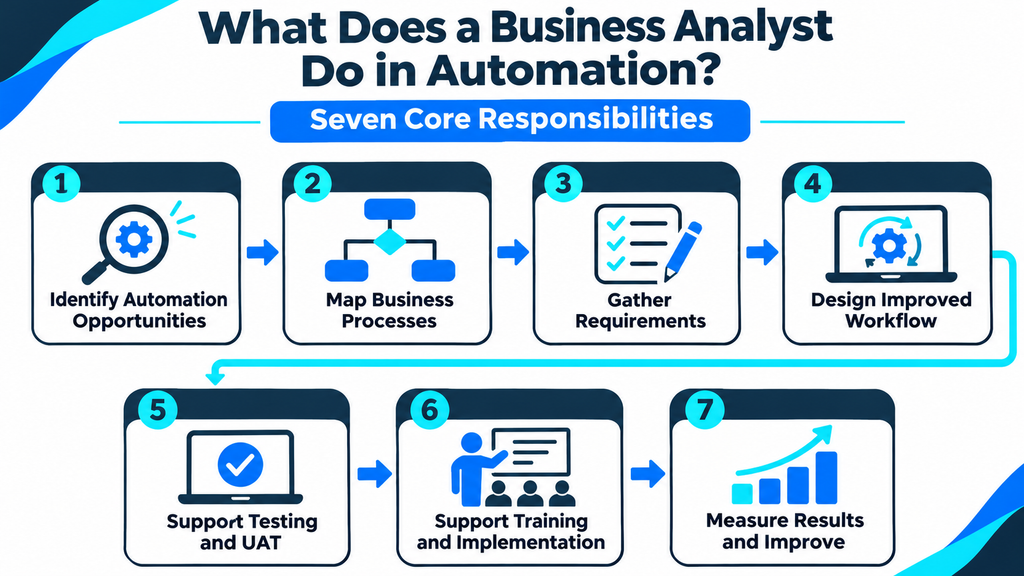
1. Identify Automation Opportunities
The analyst first looks for business processes that take too much time or involve repeated manual work.
They may interview employees, review reports, or observe how tasks are performed.
For example, a customer service team might copy information from incoming emails into a tracking system.
The analyst investigates whether automation could reduce that effort.
However, not every repeated task is a good candidate. The process must be understood before deciding how to improve it.
2. Map Existing Business Processes
Process mapping shows the steps employees follow to complete a task.
An analyst may create a flowchart showing where information comes from, what decisions employees make, and where work gets delayed.
This is often called documenting the current state, or as-is process.
For example:
Receive invoice → Check details → Enter information → Request approval → Record payment.
The analyst also identifies exceptions, such as missing invoice numbers or duplicate records.
Understanding these situations is important because automation must deal with more than ideal cases.
3. Gather Business Requirements
Business requirements explain what the organization expects from a solution.
The analyst meets with stakeholders to understand their needs and turns those needs into clear instructions.
A stakeholder is anyone affected by or responsible for the project.
For an invoice automation project, requirements might include:
- Extract the invoice number and amount.
- Check whether the supplier is approved.
- Flag missing or duplicate information.
- Send invoices requiring approval to the correct employee.
- Keep a record of completed actions.
These requirements guide developers and help testers check whether the solution works correctly.
4. Help Design the Improved Workflow
After reviewing the existing process, the analyst helps define the future state, or to-be process.
This describes how work should happen after improvements are introduced.
The analyst works with technical teams to identify which steps can be automated and where people should remain involved.
For example, software might collect invoice information automatically while employees continue approving payments.
A good solution should improve the process without removing necessary controls.
5. Support Testing and User Acceptance
An automation may work technically but still fail to meet business needs.
The analyst helps prepare test scenarios and checks the solution against the approved requirements.
One important stage is user acceptance testing (UAT).
During UAT, business users check whether the solution supports real work.
For example, they may test invoices with missing fields, unusual amounts, or incorrect supplier details.
The analyst records problems, discusses them with developers, and helps confirm whether corrections meet the requirements.
6. Support Training and Implementation
Employees need to understand how an automated process changes their daily work.
An analyst may help prepare instructions, explain the new workflow, and collect questions from staff.
They may also help teams understand which tasks remain manual and when to report a problem.
Employee adoption is an important part of successful implementation. Our guide to automation change management explains how businesses can prepare staff for new tools and workflows.
7. Measure Results and Recommend Improvements
The analyst’s work may continue after the automation goes live.
They compare the new process with the original business goals.
Common measures include:
- Average time needed to complete a task.
- Number of errors requiring correction.
- Amount of manual work still involved.
- Number of successful transactions.
- Employee feedback.
If the system creates new problems, the analyst helps investigate what needs to change.
The goal is to improve business results, not simply increase the number of automated tasks.
Real-World Example: An Automation Business Analyst at Work
Imagine a company where employees manually process hundreds of supplier invoices each month.
The finance team opens each invoice, checks the supplier, enters the amount, and sends it for approval.
An automation business analyst is asked to investigate the process.
Step 1: Understand the Problem
The analyst interviews finance employees and reviews how invoices move through the company.
They discover that manual entry and missing information create delays.
Step 2: Document the Current Process
The analyst records the existing steps and identifies where errors and delays occur.
They also note that some invoices require special approval.
Step 3: Define Requirements
The analyst works with the finance team to describe what an automated process should do.
This includes collecting approved invoice information, checking required fields, flagging duplicates, and routing exceptions to employees.
Step 4: Work With the Development Team
Developers use the requirements to build the workflow.
The analyst answers business questions and confirms how different situations should be handled.
Step 5: Test the Solution
Finance employees test sample invoices.
The analyst checks whether the system handles correct invoices, missing information, and unusual cases as expected.
Step 6: Review the Results
After an approved rollout, the analyst compares task time, errors, and manual effort against the original process.
If the workflow reduces repeated work without weakening financial controls, the project may deliver useful business value.
This is an illustrative example, not a measured case study.
Skills Required for an Automation Business Analyst
You do not need to become a software developer before exploring this career.
However, you should understand business processes, communicate clearly, and learn basic automation concepts.

Business Analysis Skills
Process mapping: The ability to document how work happens using clear steps and diagrams.
Requirements gathering: Asking the right questions and translating business needs into useful documentation.
Problem-solving: Finding the cause of delays, errors, or unnecessary work.
Data analysis: Reviewing reports and metrics to understand process performance.
Documentation: Writing clear process definitions, requirements, and testing notes.
Technical Skills
An automation business analyst benefits from basic knowledge of:
- RPA and workflow automation concepts.
- Spreadsheets and business data.
- Process diagrams and flowcharts.
- APIs, which allow software systems to exchange information.
- Automation testing and error handling.
- AI-assisted workflows and their limitations.
SQL, a language used to work with databases, may also be helpful in some positions.
These skills can support the job, but the exact technical requirements depend on the company and its automation platform.
Communication and People Skills
Automation projects involve people with different responsibilities.
An analyst must be comfortable interviewing employees, explaining requirements, listening to concerns, and discussing solutions.
Clear communication is especially valuable when developers and business users describe the same problem in different ways.
Tools Used by Automation Business Analysts
Automation business analysts use different tools depending on their organization’s systems.
| Tool or category | How it can help |
|---|---|
| Microsoft Excel | Review process data and create reports |
| Microsoft Visio or diagrams.net | Draw workflows and process maps |
| UiPath | Understand RPA projects and automation workflows |
| Microsoft Power Automate | Explore workflow automation and process improvement |
| Jira | Track requirements, tasks, and reported issues |
| Confluence | Organize project documentation |
| Process mining tools | Examine how business processes actually operate |
Process mining uses system data to help teams understand how work moves through an organization.
Task mining focuses more closely on the actions people perform while using software.
These tools can support process discovery, but an analyst still needs to understand business rules, employee needs, and the limits of the available data.
You do not need to master every tool. Start with process mapping, spreadsheets, and one automation platform.
Automation Business Analyst vs. RPA Developer
These two roles often work on the same project, but they have different areas of responsibility.
| Responsibility | Automation Business Analyst | RPA Developer |
|---|---|---|
| Identify business problems | Primary responsibility | Supports when needed |
| Gather requirements | Primary responsibility | Reviews technical details |
| Map current processes | Usually responsible | Uses process documentation |
| Build automation workflows | Supports planning and validation | Usually responsible |
| Prepare business test scenarios | Frequently involved | Supports technical testing |
| Explain business needs | Main focus | Works with the analyst |
| Fix automation code | Usually not responsible | Main technical responsibility |
The automation business analyst focuses on what the business needs and why.
The RPA developer focuses mainly on how to build and maintain the technical solution.
Responsibilities may overlap in smaller teams, but both perspectives are important.
How to Become an Automation Business Analyst
There is no single career route into automation business analysis.
People enter the field from business analysis, operations, IT support, process improvement, and related roles.
The following approach can help beginners prepare.
Step 1: Learn Business Analysis Basics
Start with stakeholder interviews, requirements gathering, process mapping, and problem-solving.
Learn how to describe a business problem before recommending software.
Step 2: Understand Automation Concepts
Study how RPA and workflow automation work.
Focus on triggers, business rules, system connections, exceptions, and human approval.
You should understand what automation can do and when manual review is still needed.
Step 3: Practice Process Mapping
Choose a familiar activity, such as expense approval or customer inquiry handling.
Draw its current steps and identify possible improvements.
Include exceptions instead of only documenting the easiest path.
Step 4: Learn One Automation Platform
Explore beginner training for a platform such as UiPath or Microsoft Power Automate.
The goal is to understand how automated workflows are structured, not necessarily to become an expert developer.
Step 5: Create a Small Portfolio Project
Prepare an example project that includes:
- A business problem.
- A current-state process map.
- A list of requirements.
- A proposed future-state workflow.
- Sample test cases.
- A plan for measuring success.
Use fictional or properly anonymized information.
This demonstrates how you think through automation problems, even if you are not yet working in a dedicated automation role.
Step 6: Apply for Related Positions
Search for roles such as automation business analyst, RPA business analyst, business process analyst, and junior business analyst.
Read job descriptions carefully because employers may expect different tools and levels of technical knowledge.
Automation Business Analyst Career Path
Career development depends on experience, industry, and the type of automation projects available.

A possible path looks like this:
| Career stage | Typical focus |
|---|---|
| Junior Business Analyst | Learn requirements, documentation, and process analysis |
| Automation Business Analyst | Support automation discovery, planning, and testing |
| Senior Automation Business Analyst | Lead complex analysis and mentor junior analysts |
| Automation Consultant or Lead | Advise teams and coordinate broader initiatives |
| Automation Program or Strategy Manager | Oversee larger automation efforts and business outcomes |
This is an illustrative progression, not a required promotion sequence.
Some professionals prefer to specialize in process improvement, solution design, product management, or automation governance.
Certifications and training can support career growth, but practical project experience and communication skills remain important.
Common Mistakes to Avoid in Automation Projects
Even a technically successful automation can disappoint if the business analysis is weak.
Common mistakes include:
Automating a broken process: If the current workflow is confusing or inefficient, automation may make the same problem happen faster.
Ignoring exceptions: Real work often includes missing data, unusual cases, and steps requiring approval.
Writing unclear requirements: Developers need enough detail to understand what the solution must do.
Skipping user testing: A working system still needs to meet business expectations.
Forgetting employee training: Staff need to understand the new process and how their responsibilities change.
Measuring only speed: Faster work is not always better if quality, accuracy, or compliance suffers.
A good automation business analyst helps the team identify these problems early.
Frequently Asked Questions
Does an automation business analyst need coding skills?
Not always. Many roles focus on requirements, process analysis, stakeholder communication, and testing. Basic technical knowledge is useful, while SQL, scripting, or deeper platform skills may be required for some positions.
What is the difference between a business analyst and an automation business analyst?
A general business analyst can support many types of business change. An automation business analyst focuses more specifically on finding, planning, testing, and evaluating automated processes.
Is an automation business analyst the same as a chief automation officer?
No. An automation business analyst usually works on business processes and solution requirements. A chief automation officer, where that executive title exists, generally focuses on wider automation strategy, governance, and organizational priorities.
Can I become an automation business analyst without RPA experience?
Yes, depending on the position. Existing business analysis or operations experience can provide a useful foundation. Learning automation concepts, building sample projects, and completing relevant training can help you prepare for entry-level opportunities.
Final Thoughts
An automation business analyst helps connect business problems with practical automation solutions.
The role involves understanding processes, gathering requirements, working with technical teams, supporting testing, and measuring results.
For professionals interested in both business and technology, it can be a useful career direction.
The best place to start is by learning how business processes work, practicing clear documentation, and exploring one automation platform. These skills provide a foundation for contributing to real automation projects.